
Szállítás a pénztárban (CCS)
Jelenítse meg a csomagátvételi pontokat önálló szállítási díjakként közvetlenül a Shopify pénztárban. Minden közeli csomagátvételi pont választható lehetőségként jelenik meg, távolság szerint rendezve — térkép és további lépések nélkül.
Elérhetőség
Szekció neve “Elérhetőség”| Csomag | Havi | Éves |
|---|---|---|
| Shopify Advanced | Tartalmazza | Tartalmazza |
| Shopify (Grow) | Fizetős kiegészítőként érhető el | Tartalmazza |
| Egyéb csomagok | Nem érhető el | Nem érhető el |
Beállítás
Szekció neve “Beállítás”1. lépés — Kapcsolja be a CCS-t a Globe-ban
Szekció neve “1. lépés — Kapcsolja be a CCS-t a Globe-ban”Lépjen a Beállítások → Szállítás a pénztárban (CCS) menübe, kapcsolja be a Carrier Calculated Shipping engedélyezése lehetőséget, és mentsen. A Globe automatikusan regisztrálja a futárszolgálati díjszabást a Shopify-ban.
2. lépés — Állítsa be a Shopify szállítási díjait
Szekció neve “2. lépés — Állítsa be a Shopify szállítási díjait”Állítsa be a szállítási díjakat minden futárszolgálathoz a Shopify adminisztráció → Beállítások → Szállítás és kézbesítés menüben. Megadhat fix árat, egy bizonyos rendelési érték feletti ingyenes szállítást vagy súly alapú árazást — pontosan úgy, ahogy bármely más szállítási módnál tenné.
Ha ezzel megvan, nyissa meg a futárszolgálatot a Globe-ban (Csomagátvételi pontok → a futárszolgálat neve → CCS szekció), kapcsolja be a CCS-t, és kattintson az Árak szinkronizálása a Shopify-ból gombra. A Globe automatikusan beolvassa az összes beállított díjat és feltételt.
3. lépés — Ismételje meg minden futárszolgálatnál
Szekció neve “3. lépés — Ismételje meg minden futárszolgálatnál”Kapcsolja be a CCS-t, és szinkronizálja az árakat minden olyan futárszolgálatnál, amelyet meg szeretne jeleníteni a pénztárban.
Mit látnak az ügyfelek
Szekció neve “Mit látnak az ügyfelek”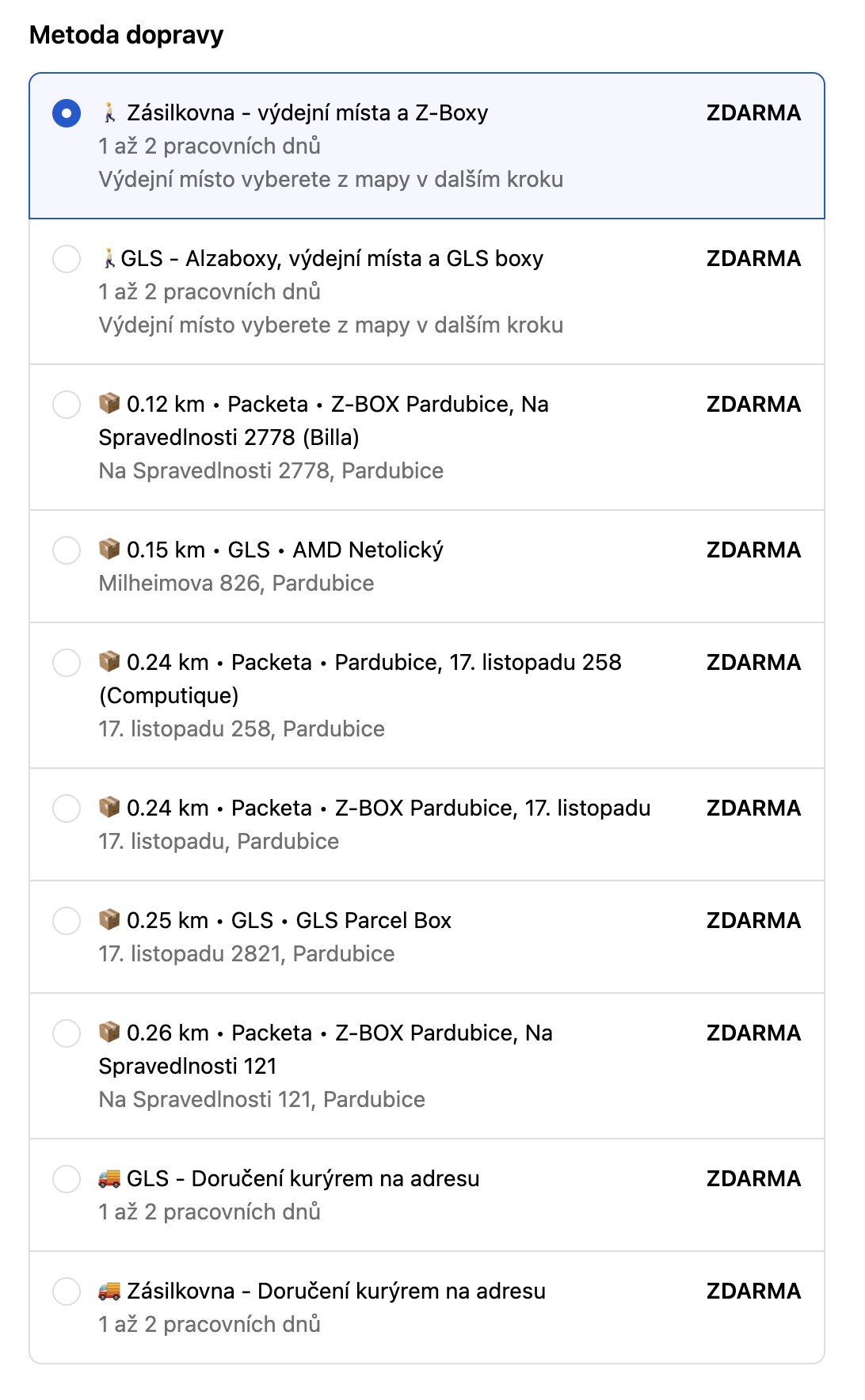
Minden csomagátvételi pont önálló szállítási díjként jelenik meg, a legközelebbivel kezdve. A megnevezés és a leírás teljesen testreszabható — lásd a Megjelenés a pénztárban részt alább.
Megjelenés a pénztárban
Szekció neve “Megjelenés a pénztárban”Azt, hogy a csomagátvételi pontok hogyan jelenjenek meg a pénztárban, a Beállítások → Szállítás a pénztárban (CCS) → Megjelenés a pénztárban menüben módosíthatja.
Az alapértelmezett formátum:
📦 0.4 km • Zásilkovna • Z-BOX Pardubice, Poděbradská 384Elérhető sablonváltozók: {{ point.distance }}, {{ point.provider }}, {{ point.name }}, {{ point.place }}, {{ point.address }}, {{ point.street }}, {{ point.city }}, {{ point.zip }}, {{ point.country }}
A leírás mezőt üresen is hagyhatja, ha nem szeretne második sort megjeleníteni.
Korlátozások
Szekció neve “Korlátozások”- Nem minden futárszolgálat támogatja a CCS-t. A nem kompatibilis futárszolgálatokat a Globe megjelöli.
- A Shopify Plus áruházaknak a Checkout App Blockot érdemes használniuk — a CCS a Plus áruházaknál ki van kapcsolva.
- A kulcsszó alapú szállítási módok nem támogatottak az árszinkronizálásnál. Használjon a Shopify-ban egyértelműen elnevezett szállítási módokat.
A CCS aktiválásának igénylése (Grow csomag)
Szekció neve “A CCS aktiválásának igénylése (Grow csomag)”A Shopify (Grow) éves csomagon előfordulhat, hogy a CCS-t a Shopify támogatásának kell aktiválnia. Küldje el nekik ezt az üzenetet:
Tárgy: Carrier Calculated Shipping bekapcsolása
Üdvözlöm! Kérem, kapcsolják be a Carrier Calculated Shipping (CCS) funkciót az áruházamban [az-on-aruhaza.myshopify.com]. Shopify Grow éves csomagot használok.
Hibaelhárítás
Szekció neve “Hibaelhárítás”Nem jelenik meg egyetlen csomagátvételi pont sem
- A CCS be van kapcsolva a Beállításokban és a futárszolgálatnál is.
- Az árak szinkronizálva lettek (kattintson az Árak szinkronizálása a Shopify-ból gombra a futárszolgálat beállításainál).
- A Shopify csomagja támogatja a CCS-t.
Megjelennek a díjak, de az ár hibás
- A Shopify szállítási díjainak módosítása után szinkronizálja újra az árakat.