
Packeta (Zásilkovna) API for Shopify

Globe Pickup Points integrates with Packeta, enabling seamless order management and parcel tracking directly from Shopify. With this integration, you can:
- Send your orders to your Packeta portal
- Print shipping labels within Shopify
- Synchronize delivery statuses between Packeta and Shopify
- Track cash on delivery payments automatically
Enabling Packeta API integration
Section titled “Enabling Packeta API integration”Follow these steps to enable the Packeta API integration in Globe Pickup Points:
- Navigate to Globe Pickup Points in your Shopify admin and open your Shipping labels in the menu. Add new carrier and select Packeta.
- Ensure your API key and API password are filled in correctly. These credentials can be obtained from your Packeta account.
- Cnfigure the following options:
- Sender label: Specify your sender label if you have multiple senders in your Packeta account.
- Automatic fulfillment: Choose to automatically mark the order as fulfilled and send a customer email with the tracking link.
- Optionally, assign your Shopify store shipping methods to the corresponding Packeta carriers.
Exporting orders to Packeta
Section titled “Exporting orders to Packeta”You can export orders to Packeta directly from Shopify in two ways:
- From the Orders Page: Select multiple orders and trigger the export in bulk.
- From the Order Detail Page: Open a specific order and trigger the export manually.
Once exported, the parcel details will be visible in your Packeta portal, and you can print shipping labels directly within Shopify.
2-way sync with Packeta
Section titled “2-way sync with Packeta”The Packeta integration includes a two-way sync, ensuring the delivery status of your parcels is updated in Shopify as they progress through the shipping process. This helps you keep track of orders without switching between platforms.
Delivery statuses
Section titled “Delivery statuses”The following delivery statuses are synced between Packeta and Shopify, allowing you to filter orders by status directly in your Shopify admin:
| Status in Shopify | Description |
|---|---|
| Tracking added | The parcel has not yet been handed over to Packeta, or the status is unknown. |
| In transit | The parcel is on its way to the destination. |
| Out for delivery | The parcel is out for home delivery or ready for pickup at the collection point. |
| Failed delivery | The parcel was not picked up, canceled, or encountered an error. |
| Delivered | The parcel has been delivered or collected. |
These statuses can be used to filter orders in Shopify, making it easier to locate parcels quickly. For detailed tracking information, you can still click through to the tracking details in your Packeta portal, but these synced statuses provide an overview directly within Shopify.
Cash on delivery tracking
Section titled “Cash on delivery tracking”With Packeta’s integration, Globe automates cash on delivery (CoD) tracking. When a CoD parcel is delivered, the order is automatically marked as paid in Shopify. This ensures your accounting and order statuses are always up-to-date without manual intervention.
To make sure this works as expected, you must add the Packeta tracking number to the fulfillment and select Packeta or Zasilkovna as the carrier. Additionally, the Cash on Delivery (COD) payment gateway should be used.
Customer returns (Z-BOX)
Section titled “Customer returns (Z-BOX)”Your customers can return a parcel through Packeta without printing anything — including drop-off at a Z-BOX.
- Open the order in Shopify and run the Create shipping labels action.
- Select your Packeta account and the product Vrácení zásilky zákazníkem (customer return).
- Confirm the creation. Packeta immediately emails the customer a drop-off code with instructions — the dialog warns you before you confirm.
The customer hands the parcel over with the code at any Packeta pick-up point or drops it into a Z-BOX. There is no label to print — after creation, Globe shows the drop-off code next to the order.
Details worth knowing:
- The customer has 5 calendar days from Packeta’s email to hand the parcel over. After that Packeta cancels the return and you have to create a new one.
- Available for orders delivered to the Czech Republic, Slovakia, Hungary and Romania — the countries with Packeta’s own pick-up network.
- The order must have a customer email address; that is where the code is sent.
- The return is delivered back to the address set in your Packeta client section (invoice address) and billed by Packeta according to their price list.
- Returns are a deliberately manual, one-order-at-a-time action — they are not available in bulk export or Flow automation.
Troubleshooting
Section titled “Troubleshooting”| Issue | Resolution |
|---|---|
| Invalid sender | Open your Packeta account at https://client.packeta.com/senders, choose which sender to use with Globe from the list, and specify the sender name in the Globe app under Shipping labels. This is only required if you use more than one sender in Packeta. The sender name is the value in the Indication column (Označení in the Czech interface) — see the screenshot below. |
| The client account is not approved for posting parcels | Contact Packeta and ask them to approve your account for posting parcels. |
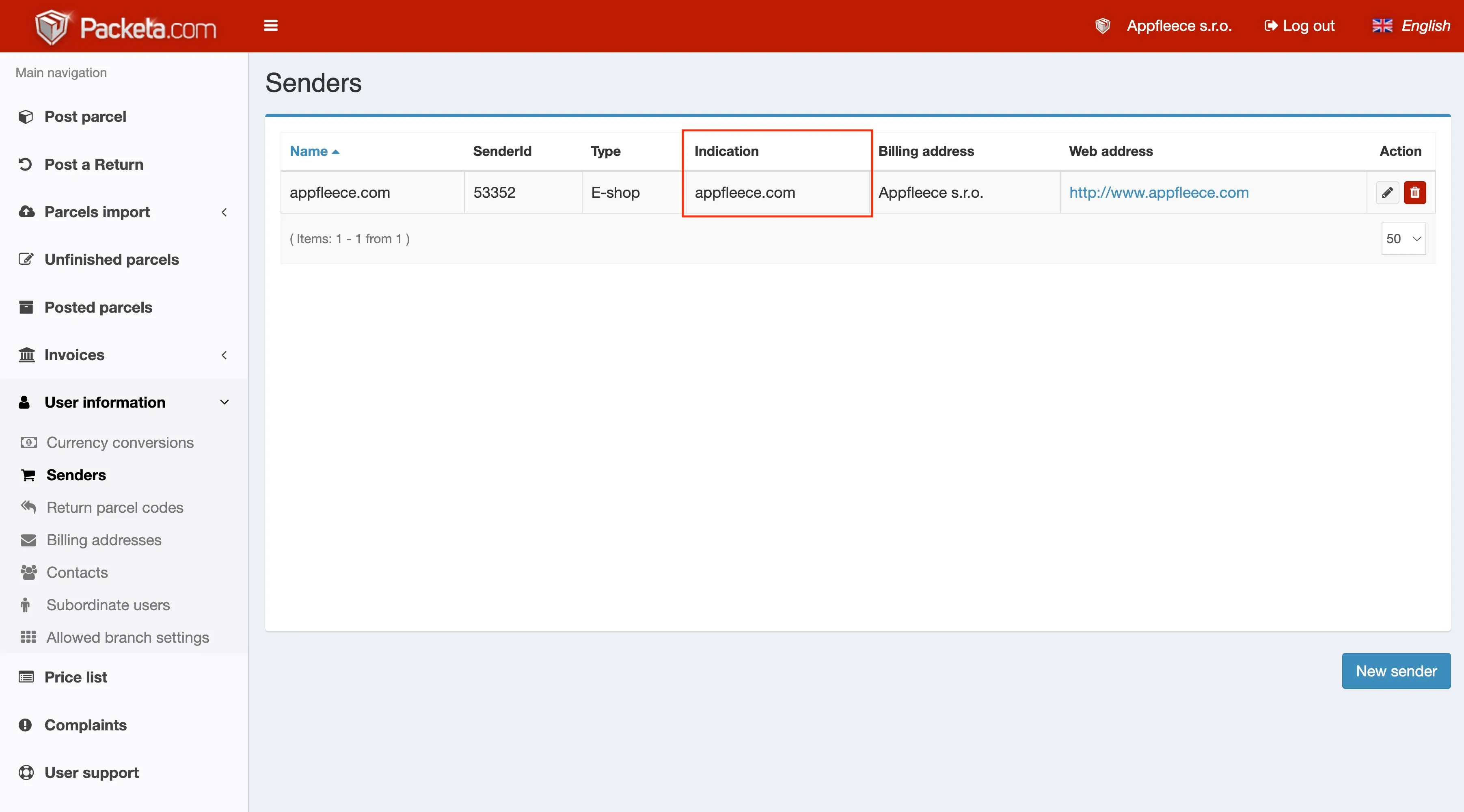
Packeta → User information → Senders — the “Indication” (Označení) column.