
Email reminders
Globe emails customers who placed an order without choosing a pickup point. The email goes out about 5 minutes after the order is created and leads the customer to the order status page, where they choose the point. Reminders are available on all plans.
Turning reminders on
Section titled “Turning reminders on”Reminders are set up for each carrier separately.
- In Globe, open Pickup points and select the carrier.
- In the Email reminders section, switch on Activate automatic email reminders if an order is missing a pickup point.
- Fill in the Default language (fallback) template. Use Add language for every other language you sell in.
- Save.
Each email uses the template in the customer’s checkout language. When there is none, the default template is used.
Which orders get a reminder
Section titled “Which orders get a reminder”- The order uses one of the carrier’s pickup point shipping methods and has no pickup point.
- The customer placed the order through Shopify checkout (online store, Headless or Hydrogen storefront, Shop app, Facebook & Instagram), or it is a draft order. POS orders, subscription renewals and orders that other apps or marketplaces create through the API don’t get a reminder.
- The order is open, unfulfilled and has an email address.
Each order gets at most one reminder.
Email template
Section titled “Email template”| Field | What it sets |
|---|---|
| Email address | The sender address. To send from your own address, add it in Settings → Custom sender emails. |
| Sender name | The name customers see as the sender. |
| Logo URL | Link to your logo image. |
| Subject, Headline, Body | The texts of the email. |
| Button, Button color | The button that leads to the order status page. |
Subject, headline and body can include order data: {{ order_name }}, {{ order_id }}, {{ first_name }} and {{ last_name }}.
Upload the logo to Content → Files in Shopify, copy its link and paste it into Logo URL. Use a PNG or JPG image; the address must start with https://.
Globe checks the address as you type. It tells you when the link leads to a web page, your Shopify admin or a file on your computer instead of an image, and it shows the logo at the size it will have in the email. An SVG logo from Shopify Files is sent as a PNG, because Gmail and many other email apps don’t show SVG images.
Preview
Section titled “Preview”Every language has a Preview button. It shows the email exactly as it will be sent, with a sample order, including changes you haven’t saved yet.
Nearest pickup points in the email
Section titled “Nearest pickup points in the email”Switch on Show the 5 nearest pickup points in the email and the email lists the carrier’s five pickup points nearest to the customer’s shipping address. Each point shows its address, distance and type, with a Choose this point button. Show more pickup points below the list leads to the order status page.
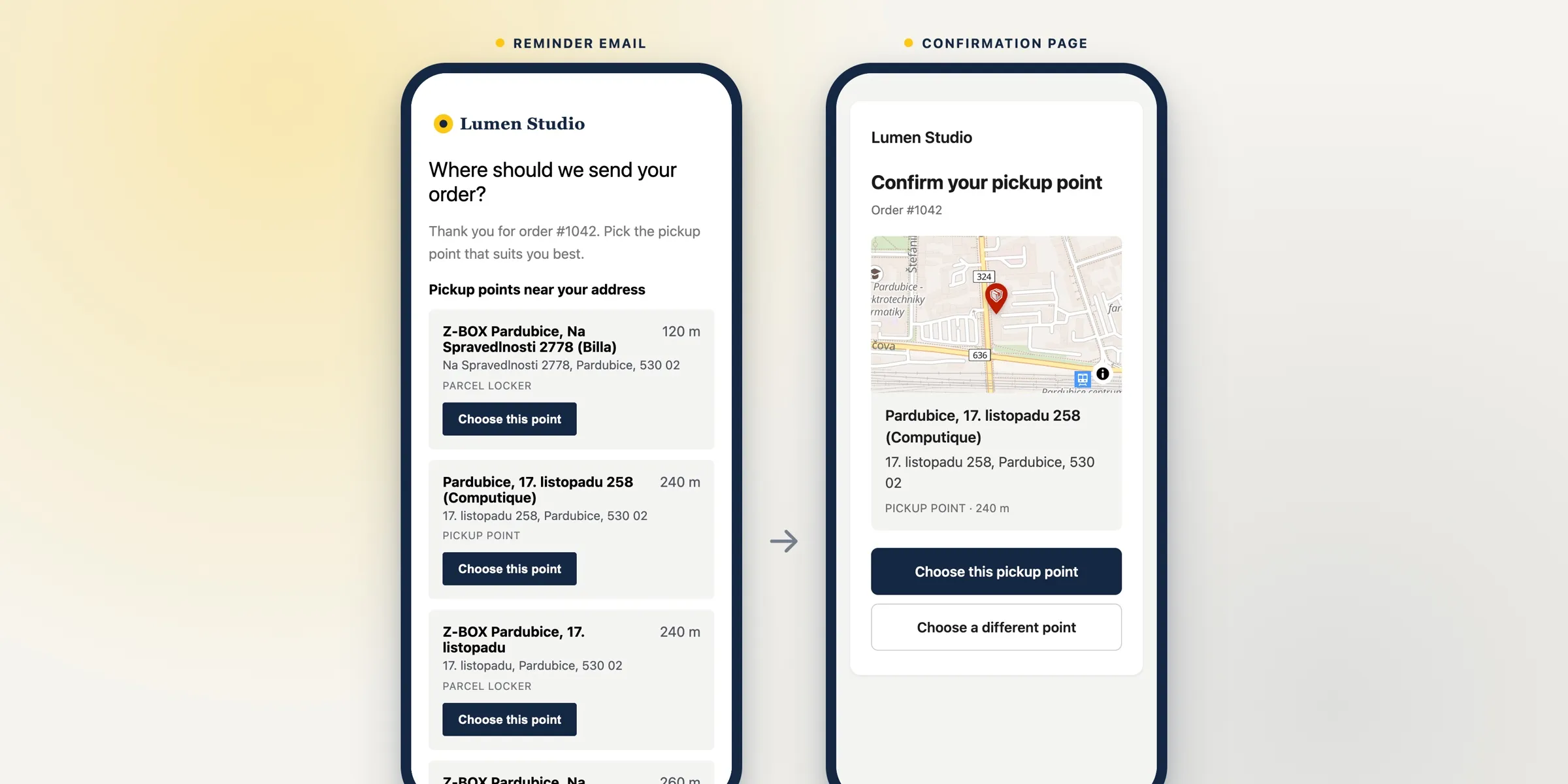
Globe offers the same points the customer would see for that address in the pickup point selector, nearest first. Points that need a customer number, such as DHL Packstation in Germany, are left out.
When the carrier has no pickup point near the shipping address, the reminder is not sent.
What the customer sees
Section titled “What the customer sees”Choose this point opens a page with your logo, the point on a map and two buttons:
- Choose this pickup point saves the point to the order and opens the order status page. The point is saved just as if the customer chose it on the order status page, so your order attributes, tags, notes and shipping address update apply.
- Choose a different point opens the order status page, where the customer can choose any other point.
Globe never replaces a pickup point the order already has. If the customer opens the link after a point was chosen, the page tells them the order already has a pickup point and that they can contact your store to change it.
The links work for 30 days and stop working once the order is cancelled or fulfilled. The list of points and the confirmation page are in the language of the email.
Custom email design
Section titled “Custom email design”If our team set up a custom template for you, the nearest points appear only after they are added to it. Write to support to have them added.
Globe block on the order status page
Section titled “Globe block on the order status page”Reminders lead customers to the order status page, where they choose the point in the Globe block. When the block is missing, Globe shows a warning in the Email reminders section with an Add block button. Reminders are still sent, but customers can’t choose a point on that page until the block is added.
See Adding pickup point selector to checkout and post-purchase.
Related
Section titled “Related”- Automatic pickup point selection with Shopify Flow selects the nearest point for orders where the customer doesn’t choose one.
- Where can I view the selected pickup point in administration? shows whether a reminder was sent for an order.